 Caleb Whitaker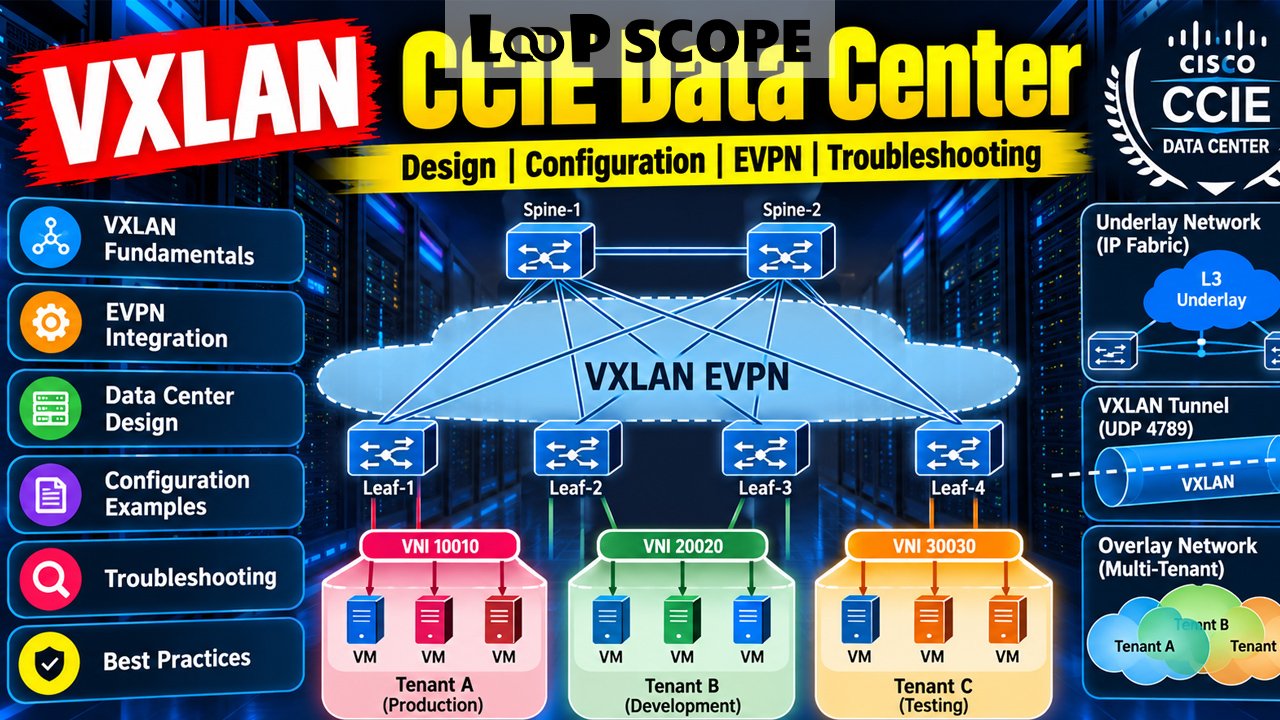
If you are preparing for the CCIE Data Center, VXLAN is the topic that ties everything else together. Modern data center fabrics, whether built by hand on Nexus switches or delivered through Cisco ACI, depend on VXLAN to carry Layer 2 and Layer 3 traffic across an IP network. Understanding VXLAN for the CCIE Data Center means more than memorizing commands. You need to know why each piece exists, how the pieces interact, and what breaks when one of them is misconfigured.
This guide walks through the concepts, the control plane, the design choices, and the practical habits that matter for the exam and for real deployments. It is written for engineers who already know routing and switching and want a clear, honest picture of what VXLAN demands.
What Is VXLAN and Why Does It Matter for the CCIE Data Center?
VXLAN (Virtual Extensible LAN) is a network virtualization technology that encapsulates Layer 2 Ethernet frames inside UDP packets, so those frames can travel across a routed Layer 3 network. It is defined in RFC 7348 and uses a 24-bit identifier called the VNI (VXLAN Network Identifier) to separate one virtual network from another.
For CCIE Data Center candidates, VXLAN matters because it is the foundation of the overlay networks used in modern fabrics. Cisco’s data center portfolio, from standalone Nexus 9000 fabrics running NX-OS to ACI, relies on VXLAN encapsulation. If you understand it deeply, most fabric behavior stops feeling like magic.
Why VXLAN Exists: The Problems It Solves
VXLAN was created to fix real limitations in traditional data center design. Three of them stand out.
The VLAN Limit
A VLAN ID is 12 bits long, which gives you 4,094 usable VLANs. That is plenty for a small enterprise and painfully tight for a multi-tenant environment. A VNI is 24 bits, which allows about 16 million segments. Scale stops being a concern.
Spanning Tree and Layer 2 Sprawl
Stretching VLANs across a large Layer 2 domain means relying on Spanning Tree, blocked links, and a broadcast domain that grows with every rack. VXLAN lets you build the physical network as a routed spine-leaf fabric where every link is active and equal-cost multipathing does the load balancing.
Workload Mobility
Virtual machines and containers move. They expect to keep their IP and MAC addresses when they do. VXLAN lets a workload stay in the same logical segment even when the leaf switch it sits behind changes, because the segment is an overlay built on top of routed transport.
How VXLAN Works: The Building Blocks
The technology is easier to reason about once you separate the underlay from the overlay. The underlay is the routed IP network that connects switches. The overlay is the set of virtual networks that ride on top.
VTEPs
A VTEP (VXLAN Tunnel Endpoint) is the device that encapsulates and decapsulates traffic. On most Nexus fabrics, each leaf switch acts as a VTEP. The tunnel interface is called an NVE (Network Virtualization Edge) interface, and it takes its source address from a loopback.
VNIs
Each Layer 2 segment maps to an L2 VNI, and each tenant VRF maps to an L3 VNI. On a leaf, you tie a local VLAN to a VNI, which is how a locally significant VLAN becomes a fabric-wide segment.
Encapsulation and MTU
When a frame enters the fabric, the ingress VTEP wraps it with a VXLAN header, a UDP header (destination port 4789), an outer IP header, and an outer Ethernet header. That adds roughly 50 bytes to every packet. If your underlay MTU is still 1500, larger frames will be dropped or fragmented. This is one of the most common reasons a fabric appears to work for pings but fails for real traffic. Jumbo frames on the underlay are standard practice.
Why BGP EVPN Is the Control Plane You Need to Know
Early VXLAN deployments used flood and learn behavior, where VTEPs discovered remote MAC addresses by flooding unknown traffic, much like a classic switch. It works, but it scales poorly and wastes bandwidth.
BGP EVPN (Ethernet VPN) solves this by advertising MAC addresses, IP addresses, and prefixes through BGP instead of learning them through flooding. The address family is L2VPN EVPN, and the general framework comes from RFC 7432, with VXLAN-specific behavior described in RFC 8365.
Because leaf switches learn endpoint information through BGP, they can build forwarding tables without flooding everywhere. This also enables features like ARP suppression, where the local leaf answers ARP requests on behalf of known remote hosts.
The EVPN Route Types You Should Know Cold
| Route Type | Name | What It Does |
|---|---|---|
| Type 1 | Ethernet Auto-Discovery | Supports multihoming and fast convergence |
| Type 2 | MAC/IP Advertisement | Advertises endpoint MAC and, optionally, IP addresses |
| Type 3 | Inclusive Multicast | Builds the flood list for broadcast, unknown unicast, and multicast (BUM) traffic |
| Type 4 | Ethernet Segment | Elects a designated forwarder in multihomed setups |
| Type 5 | IP Prefix | Advertises Layer 3 prefixes, often for external connectivity |
Route Types 2, 3, and 5 show up constantly in day-to-day fabric work. Types 1 and 4 matter when you use EVPN multihoming. Being able to look at a BGP table and say what each route is doing is a skill that pays off on lab day.
Designing the Underlay
A clean underlay makes the overlay boring, which is exactly what you want. Typical choices include OSPF, IS-IS, or eBGP between leaf and spine. Any of them can work; what matters is that every VTEP loopback is reachable from every other VTEP with equal-cost paths.
Handling BUM Traffic
There are two common ways to replicate broadcast, unknown unicast, and multicast traffic:
- Ingress replication (unicast): The source VTEP sends a separate copy to each remote VTEP that has joined the VNI. It is simple and does not require multicast in the underlay.
- Multicast underlay (PIM): The underlay carries a multicast group per VNI or group of VNIs. This is more efficient at scale but adds PIM to the design and troubleshooting workload.
Know both. A realistic exam scenario may specify one and expect you to configure it correctly under time pressure.
Building the Overlay: Layer 2 and Layer 3 Services
Distributed Anycast Gateway
In a VXLAN EVPN fabric, every leaf can host the same default gateway IP and virtual MAC for a subnet. Hosts always find their gateway on the local leaf, no matter where they move. This removes the need for first-hop redundancy protocols like HSRP inside the fabric and keeps routing local and efficient.
Symmetric Integrated Routing and Bridging
Routing between subnets in different VNIs uses IRB (Integrated Routing and Bridging). Most Cisco designs use the symmetric model. Traffic routed between hosts travels through an L3 VNI tied to the tenant VRF, so both the ingress and egress leaf perform a routing lookup. Symmetric IRB scales better than the asymmetric model because a leaf does not need every VLAN and VNI configured everywhere.
Multihoming
Servers usually connect to two leaf switches for redundancy. There are two main approaches on Nexus platforms:
- vPC with a shared anycast VTEP: The two peers present a common secondary IP address as a single logical VTEP. This is mature and widely deployed.
- EVPN multihoming with Ethernet Segment Identifiers (ESI): The redundancy is signaled through BGP EVPN itself, using Route Types 1 and 4, without a vPC peer link.
Understanding the tradeoffs between the two, including failure behavior and operational complexity, is the kind of judgment the lab rewards.
A Simplified NX-OS Configuration Example
The snippet below shows the core pieces of a leaf configured for a single L2 VNI with ingress replication. It is deliberately minimal and leaves out the underlay, BGP neighbors, and anycast gateway.
Every line here answers a specific question. Which VLAN maps to which VNI? How does the NVE learn remote hosts? How are BUM packets replicated? Which route targets control who imports the routes? If you can explain each line without looking at notes, you are in good shape.
Where VXLAN Fits in the CCIE Data Center Exam
The CCIE Data Center certification has traditionally combined a written qualifying exam (350-601 DCCOR) with an eight-hour hands-on lab. VXLAN and BGP EVPN sit inside the network infrastructure portion, alongside topics like ACI, automation, and other data center technologies.
Cisco revises tracks, exam codes, and blueprints from time to time, so check the current exam topics on Cisco’s official certification pages before you build a study plan. The overall skill you are building stays the same: configure, verify, and troubleshoot a fabric quickly and accurately.
Troubleshooting VXLAN EVPN Fabrics
Most problems fall into a handful of categories. A methodical order of checks saves time.
- Underlay reachability: Confirm every VTEP loopback can reach every other one. If it cannot, nothing else matters.
- MTU: Verify jumbo frames across every underlay link.
- NVE state: Use
show nve peersandshow nve vnito confirm tunnels are up and VNIs are mapped. - BGP EVPN sessions: Use
show bgp l2vpn evpn summaryto make sure neighbors are established and prefixes are being exchanged. - Route targets and VRF mapping: A mismatch in route-target import or export is a classic cause of missing routes.
- Endpoint learning: Use
show l2route evpn mac allto see whether MAC addresses are being learned and advertised.
Notice the order. Starting at the top of the stack and working down wastes time when the real fault is a missing loopback route or a wrong MTU.
How to Study VXLAN for the Lab
Reading about VXLAN will only get you so far. The lab tests speed and accuracy, so hands-on repetition matters more than any book.
Build a Fabric From Scratch, More Than Once
Set up a small spine-leaf topology in a virtual lab and configure it from an empty state. Do it again the next week without notes. The second time exposes the gaps in your memory.
Practice Breaking Things on Purpose
Change an MTU, remove a route target, shut down a loopback, or mismatch a VNI. Then troubleshoot your own mess. This is a far better teacher than a perfect configuration that works on the first try.
Learn to Verify, Not Just Configure
A configuration that is entered but never verified is a liability. Get comfortable with the show commands that confirm each layer, from underlay adjacency to EVPN route tables to endpoint reachability.
Understand Why, Not Just How
Ask yourself why a design uses symmetric IRB, why a fabric prefers ingress replication in a given case, or why a route type appears in the BGP table. That reasoning helps most when a task is worded differently than anything you practiced.
Common Mistakes Engineers Make
A few errors show up repeatedly, and they are worth naming.
- Forgetting to enable required features before configuring the NVE or EVPN sections.
- Using the same loopback for BGP peering and VTEP sourcing without thinking through reachability and advertisement.
- Overlooking the anycast gateway MAC, or configuring it inconsistently across leaves.
- Treating the L3 VNI as optional in a symmetric IRB design.
- Skipping the verification step and assuming a clean configuration means a working fabric.
None of these are exotic. They are ordinary slips, which is why they cost so much time under pressure.
Conclusion
VXLAN for the CCIE Data Center rewards engineers who understand the whole system rather than isolated commands. The overlay carries the traffic, BGP EVPN tells switches where endpoints live, and a solid underlay keeps everything reachable. When you can explain how those layers depend on one another, configuration and troubleshooting become far more predictable.
Start with the fundamentals: VTEPs, VNIs, encapsulation, and MTU. Add BGP EVPN route types, then work through anycast gateways, symmetric IRB, and multihoming. Build and break labs until verifying each layer is automatic. That combination of concept and practice is what turns VXLAN from an intimidating topic into a strength.
Frequently Asked Questions
What is VXLAN in simple terms?
VXLAN is a way to carry Layer 2 network traffic across a Layer 3 network by wrapping it in UDP packets. It lets you build large, flexible virtual networks on top of a routed physical infrastructure.
Is VXLAN on the CCIE Data Center exam?
VXLAN and BGP EVPN have been core topics in the CCIE Data Center track. Because Cisco updates blueprints periodically, confirm the current exam topics on Cisco’s official site.
What is the difference between VXLAN and VLAN?
A VLAN uses a 12-bit ID and is limited to about 4,094 usable segments. VXLAN uses a 24-bit VNI, supports roughly 16 million segments, and can extend across routed networks.
Do I need BGP EVPN to run VXLAN?
No. VXLAN can operate with flood and learn behavior. BGP EVPN is the preferred control plane in modern fabrics because it scales better and reduces unnecessary flooding.
What MTU does VXLAN require?
VXLAN adds about 50 bytes of overhead, so the underlay MTU must be larger than the payload size. Most designs enable jumbo frames on all underlay links.
What is a VTEP?
A VTEP is the device or interface that encapsulates traffic into VXLAN and decapsulates it on the way out. In most Nexus fabrics, each leaf switch is a VTEP.
How long does it take to learn VXLAN for the CCIE Data Center?
It depends on your background. Engineers with strong routing and BGP experience often need weeks of focused lab practice to get comfortable, while others may need several months.